6.1 Configurer LM Studio et LangSmith
Intention: donner à l'agent un LLM local pour les décisions ambiguës et une observabilité LangSmith pour inspecter les runs.
LM Studio
Démarrer LM Studio Local Server sur http://127.0.0.1:1234/v1, puis vérifier les modèles:
| Bash | |
|---|---|
Lancer le wizard LLM:
| Bash | |
|---|---|
Répondre:
| Text Only | |
|---|---|
Vérifier config/adapters/outbound/lm.yaml:
| YAML | |
|---|---|
LangSmith
LangSmith est optionnel pour exécuter localement, mais utile pour inspecter les runs.
Si vous travaillez hors ligne, conserver observability.enabled: [] et passer directement à la
configuration LangGraph:
| Text Only | |
|---|---|
Sinon, ajouter LangSmith avec le profil de développement:
| Bash | |
|---|---|
Répondre:
Vérifier config/adapters/outbound/langsmith.yaml:
| YAML | |
|---|---|
La CLI écrit uniquement les valeurs non secrètes dans .env.example. La clé est injectée dans le
runtime via LANGSMITH_API_KEY, jamais via un argument CLI ou dans Git. LangSmith sert à observer
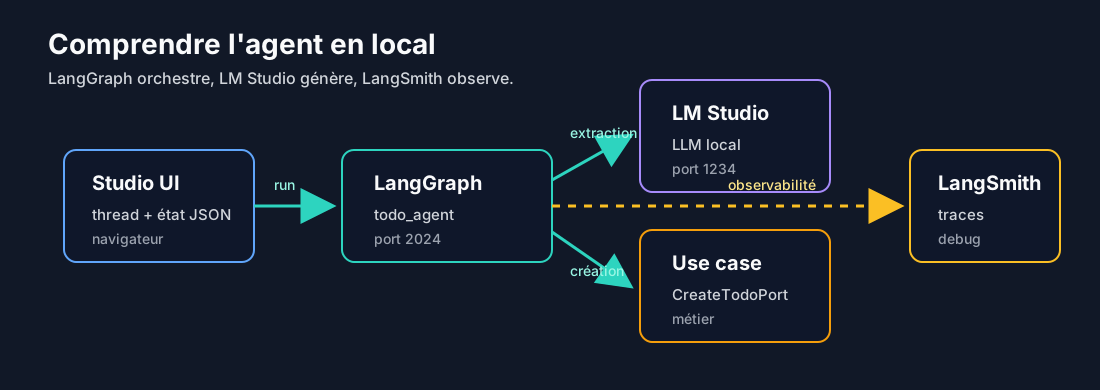
l'agent:
- LangGraph exécute le graphe localement;
- LM Studio fournit le modèle local;
- LangSmith affiche les runs, les messages, les appels LLM et les erreurs.
Sans internet, LangGraph continue de tourner localement. L'inspection se fait alors avec
http://127.0.0.1:2024/docs, /runs/stream et /threads/{thread_id}/state.
LangGraph config
Vérifier config/adapters/inbound/langgraph.yaml:
| YAML | |
|---|---|
Modifier langgraph.json:
| JSON | |
|---|---|
Pour prouver cette configuration avant de continuer, utiliser Validation IA locale et hors ligne.
Étape suivante: écrire les intent-interpreters.